Data Quality Trends
A Summary records how a Table's data quality looked in one Transaction. Trends keep that history: every time the check runs, its summary is folded into a trend Table that holds the recent runs one by one, plus weekly and monthly totals that reach further back. Reading the trend Table shows whether a rule fails more or less often over time, without keeping every version of the summary.
Trends are off by default. Turn them on by passing Trends() to the trends argument of Summary:
from tabsdatak.api import transformer, TableFrameSpec
from tabsdatak.dataquality import (
    DataQuality,
    IsBetween,
    IsIn,
    IsNotNull,
    Summary,
    Trends,
)


@transformer(
    input_tables=["raw_orders"],
    output_tables=["orders"],
    on_tables=[
        DataQuality(
            table="orders",
            classifiers=[
                IsNotNull(["order_id"]),
                IsBetween(["amount"], min_val=0, max_val=10000),
                IsIn(["status"], values={"open", "shipped", "cancelled"}),
            ],
            operators=[Summary(trends=Trends())],
        ),
    ],
)
def clean_orders(raw_orders: TableFrameSpec) -> TableFrameSpec:
    return raw_orders.unique()
Each run of clean_orders writes orders_dq_summary as before, and Tabsdata then folds that summary into orders_dq_summary_trends.
The classifiers run while the data is written, in the same execution of the Function. Tabsdata does not read the Table again afterwards to compute the summary or the trend, so there is no separate quality job and no second pass over the data.
The summary and trend Tables are Tabsdata Tables, versioned like any other. Every execution creates a new version of both, so the summary and the trend of any past execution can be read as they were at that point.
See Data Quality for the classifiers and operators a check is built from.
Data quality in the Tabsdata UI
The Tabsdata UI recognizes data quality Tables and shows them without any setup. A Table that has data quality checks is marked with a Q next to its name, in the Table list and in the execution plan graph.
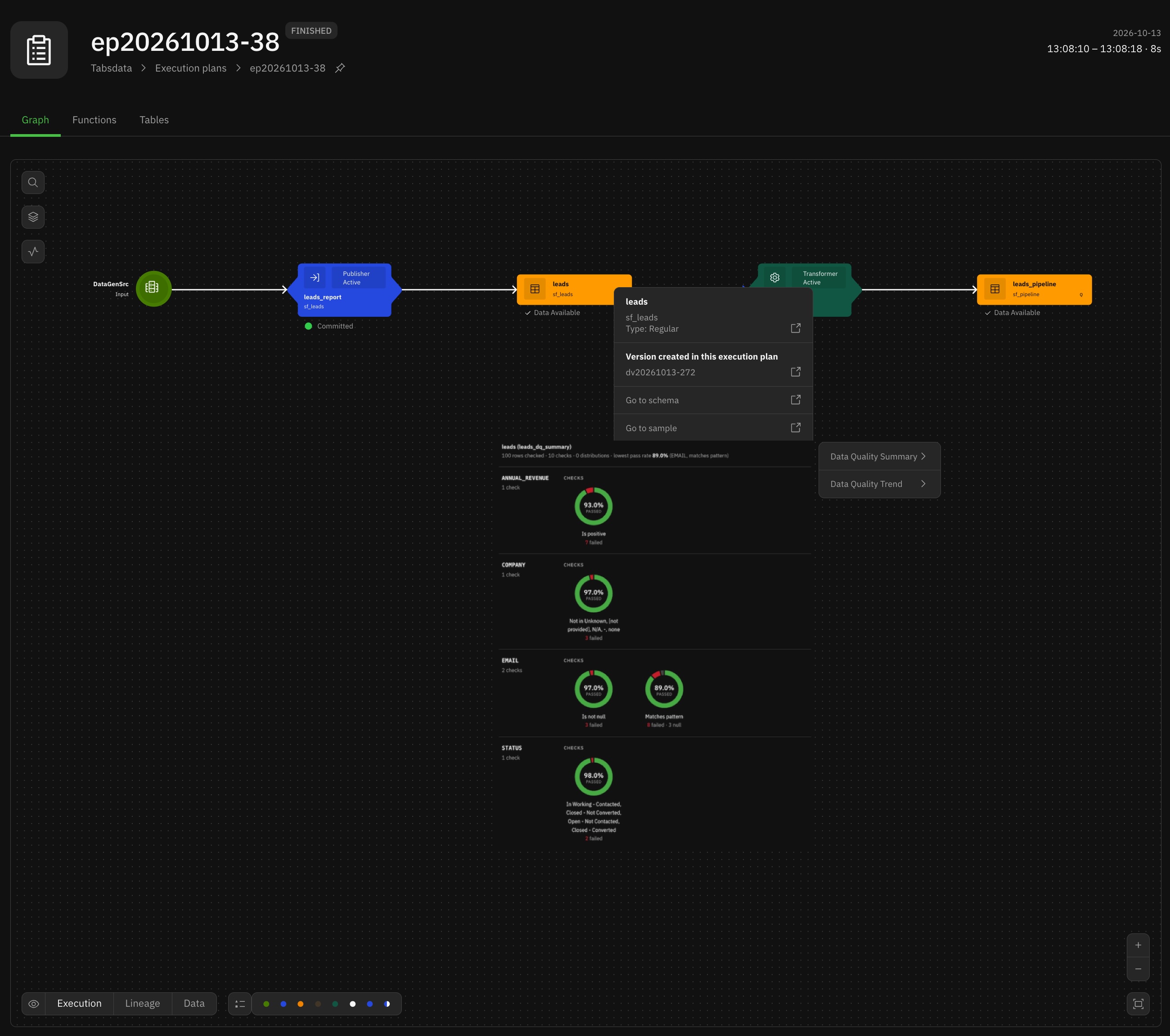
The data quality summary of the leads Table for one execution, opened from the execution plan graph: 100 rows checked, 10 checks, grouped by column. Each check shows its pass rate and how many rows failed or were null, and the lowest pass rate is called out at the top.
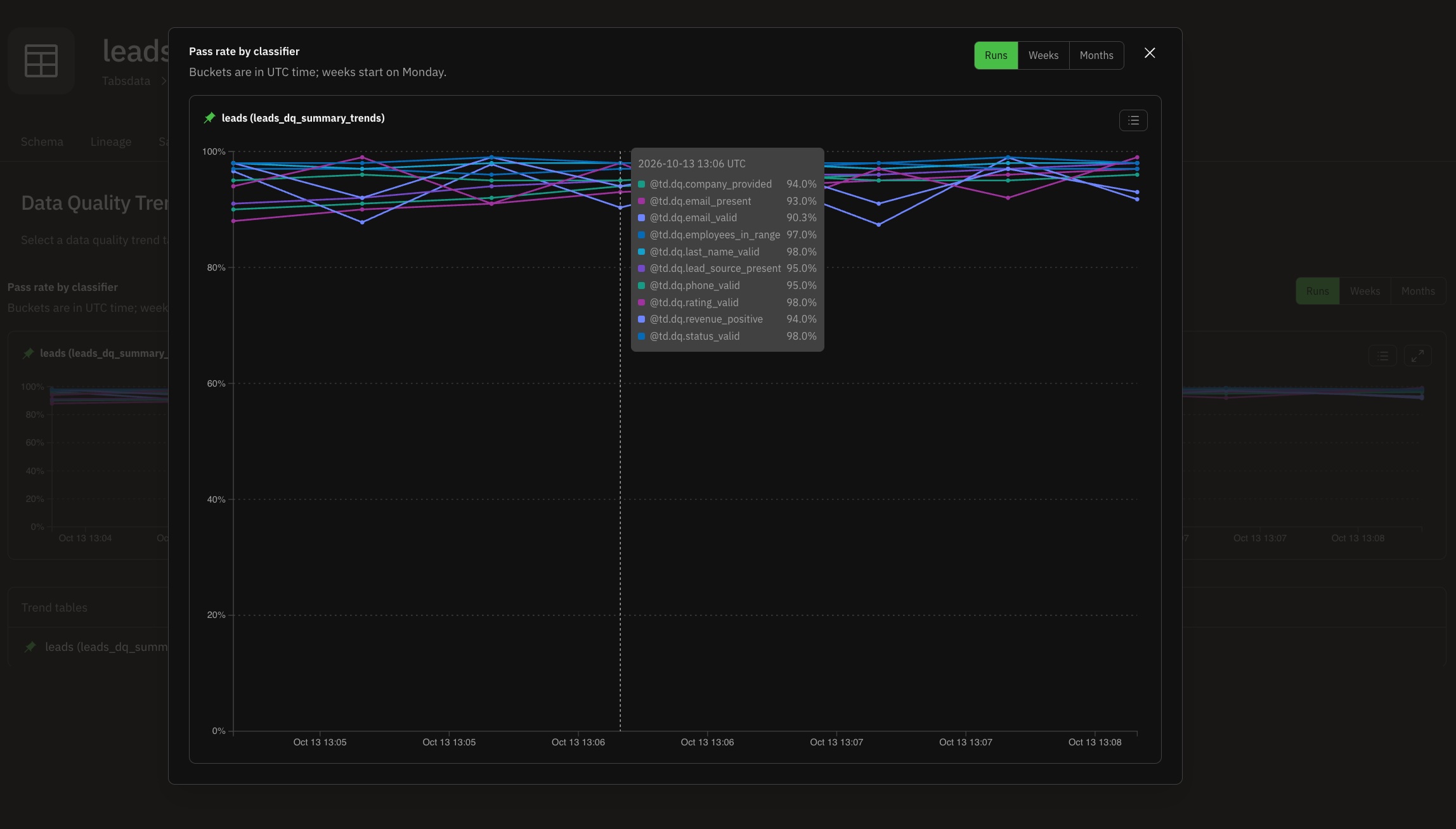
The Data Quality Trends tab of the leads Table, with its trend chart expanded: the pass rate of every classifier, execution by execution. Hovering over an execution shows all the pass rates at that point.
A Table's data quality shows in two places:
- The Table's page. A Table with a summary has a Data Quality Summaries tab, and a Table with a trend has a Data Quality Trends tab. Each tab lists the Table's summary or trend Tables; select one to chart it.
- The execution plan graph. Right-click a Table and open Data Quality > Data Quality Summary or Data Quality Trend to see the summary or trend as it was written by that execution.
The trend chart, titled Pass rate by classifier, plots pass_pct for every classifier:
- Runs, Weeks, and Months switch between the
run,week, andmonthrows of the trend Table. Buckets are in UTC, and weeks start on Monday. - The legend button shows or hides individual classifiers, and the expand button opens a larger chart.
- On the Data Quality Trends tab, a trend Table can be pinned, so that its chart stays on the board while other trend Tables are selected.
Trends
Trends configures the trend Table: its name and how long each tier keeps its rows.
from tabsdatak.dataquality import Summary, Trends

Summary(trends=Trends())
Summary(trends=Trends(table="orders_quality_history", days=14, weeks=26, months=36))
Summary(trends=Trends(days=7, weeks=13, months=0))
The first keeps the default retention, the second names the Table and keeps longer history, and the third keeps no month tier.
Parameters
table
The Table the trend is written to, as a valid table name. Defaults to None, which writes to <target>_dq_summary_trends, where <target> is the Table the DataQuality check runs on. The default name does not follow Summary(table=...): a summary written to orders_quality still gets its trend in orders_dq_summary_trends unless table is set. A name given here is used as is, with no suffix added. The trend Table is created in the same collection as the Function.
days
How many days a run is kept as its own row, as a non-negative integer. Defaults to 7. A run counts towards its week and month from its first execution, so expiring its run row does not remove it from the coarser tiers. 0 keeps no run rows.
weeks
How many weeks a week row is kept, counted from the Monday that starts it, as a non-negative integer. Defaults to 12, which keeps the current week and the 11 before it. 0 keeps no week rows.
months
How many months a month row is kept, counted from the 1st of the month, as a non-negative integer. Defaults to 24, which keeps the current month and the 23 before it. 0 keeps no month rows.
At least one of days, weeks, and months must be greater than zero. To keep no trend, leave trends unset.
How the trend Table is organized
Tiers
The trend Table holds four kinds of rows, told apart by the grain column:
grain | One row per | bucket holds |
|---|---|---|
run | classifier and run | The time of the run |
week | classifier and week | Monday 00:00 UTC of the week |
month | classifier and month | The 1st of the month, 00:00 UTC |
folded | Transaction already counted | The time of the run |
The tiers overlap. A run is added to its week and its month as soon as it happens, not when its run row expires, so the current week row already includes the runs that are still listed one by one, and a month row includes every run of that month. Each tier expires on its own: a week that falls out of the weeks window is still counted in its month row.
Weeks and months are bucketed independently, so a week that crosses into a new month is one week row while its runs count towards two month rows. Adding week rows together does not give a month row.
Retention
Retention is measured against the newest run folded into the Table, not against the wall clock. With the defaults, after a run on a given day the Table holds:
- a run row for each run in the 7 days before it
- a week row for that week and each of the 11 weeks before it
- a month row for that month and each of the 23 months before it
Rows only expire when the trend is updated, so a Table whose check stops running keeps its last rows as they were.
Folded rows and recovered Transactions
Each folded row records one Transaction whose results the week and month rows already include. It carries the Transaction ID and the time of the run, and no counts. When a summary arrives for a Transaction that has a folded row, for example because the Transaction was recovered, it is not counted a second time. Summaries that arrive out of order are still counted once each.
A folded row is kept for as long as the week or month tier could still be holding that run. When both weeks and months are 0, no folded rows are kept.
Trend Table schema
| Column | Type | Description |
|---|---|---|
grain | string | run, week, month, or folded. |
bucket | datetime (UTC) | The run time for run and folded rows, the Monday that starts the week for week rows, and the 1st of the month for month rows. |
classifier | string | The verdict column the counts belong to, as in the summary, for example @td.dq.order_id_is_not_null or the name given in a (column, verdict_column) tuple with its prefix. Null on folded rows. |
runs | int64 | 1 on a run row; the number of runs in the bucket on week and month rows. Null on folded rows. |
passed | int64 | Rows that passed the classifier. |
failed | int64 | Rows that failed the classifier. |
nulls | int64 | Rows with a null verdict. |
nans | int64 | Rows with a NaN verdict. |
pass_pct | float64 | passed * 100 / (passed + failed). Null and NaN verdicts are left out. Null when passed + failed is 0, and on folded rows. |
txn | string | The Transaction ID on run and folded rows. Null on week and month rows. |
folded_through | datetime (UTC) | The time of the newest run folded so far. Every row of a version holds the same value. |
On week and month rows, passed, failed, nulls, and nans are summed over the runs in the bucket, so pass_pct is the share of passing rows across the whole bucket, not an average of the runs' percentages. Like every Tabsdata Table, the trend Table also carries the $td. system columns.
Only boolean classifiers are tracked. ScaleCategorizer results appear in the summary but not in the trend Table, and a summary with only categorizers adds no rows to its trend Table. Tags on Summary apply as usual: the trend tracks the classifiers the summary includes.
How the trend Table is maintained
Registering a Function that declares Summary(trends=Trends(...)) also registers a second Function, the trend Function. The trend Function:
- is named after the trend Table with
_trendappended, for exampleorders_dq_summary_trends_trend - reads the latest summary and the latest version of the trend Table, and writes a new version of the trend Table
- runs in the same execution as the parent Function, after the summary is written
- is registered even in a collection that does not otherwise accept transformers
Each run writes a new version of the whole trend Table: the previous version is read back, the new summary is merged in, and the rows that fell out of their tier's window are dropped. Earlier versions of the trend Table stay available like any other Table's.
The trend Table is linked to the Table the check runs on, not to the summary, and its data versions report that Table as their parent.
Lifecycle
The trend Function belongs to the Function that declares the Summary, its parent, and follows it:
- Updating the parent Function with the same declaration keeps the same trend Function. Changing
days,weeks, ormonthskeeps its name. - Renaming the trend Table, through
table, replaces the trend Function with one named after the new Table. - Adding
trendsto an existingSummaryregisters a trend Function on the next update. - Removing
trends, or the wholeDataQualitycheck, deletes the trend Function. The trend Table is kept, frozen, with its history. - Deleting the parent Function deletes the trend Function, and leaves their Tables frozen. Registering the parent Function again with
tdk fn register --reuse-tablestakes the frozen Tables back, history included. - Disabling or enabling the parent Function does the same to the trend Function.
- Moving the check to another Table of the same Function keeps the summary and trend Tables and links them to the new Table.
- No longer producing the Table the check runs on freezes that Table, its summary, and its trend Table. Deleting the frozen Table also deletes the summary and trend Tables derived from it.
The trend Function cannot be managed directly. Updating, patching, deleting, enabling, disabling, or triggering it by name is refused with:
Function '<name>' is a child function managed by its parent; it cannot be updated, patched, deleted, enabled or triggered directly
Make the change on the parent Function instead.
Examples
Tracking a source report run by run
A sales operations team publishes the Salesforce Lead Lifetime report once a week and wants to know which data entry problems are getting better. The publisher checks every run and keeps a trend:
from tabsdatak.api import TableFrameSpec, publisher
from tabsdatak.conn.salesforce import SalesforceReportSrc
from tabsdatak.dataquality import (
    DataQuality,
    HasLength,
    IsBetween,
    IsIn,
    IsNotIn,
    IsNotNull,
    IsPositive,
    Matches,
    Summary,
    Trends,
)


@publisher(
    source=SalesforceReportSrc(reports=["Lead Lifetime Report"], find_report_by="name"),
    output_tables=["leads"],
    on_tables=[
        DataQuality(
            table="leads",
            classifiers=[
                IsNotNull([("EMAIL", "email_present")]),
                Matches([("EMAIL", "email_valid")], pattern=r"^[^@]+@[^@]+\.[A-Za-z]{2,}$"),
                IsNotNull([("LEAD_SOURCE", "lead_source_present")]),
                IsNotIn([("COMPANY", "company_provided")], values={"[not provided]", "N/A", "Unknown"}),
                IsIn([("RATING", "rating_valid")], values={"Hot", "Warm", "Cold"}),
                IsBetween([("EMPLOYEES", "employees_in_range")], min_val=1, max_val=10_000),
                HasLength([("LAST_NAME", "last_name_valid")], min_len=2, max_len=80),
                IsPositive([("ANNUAL_REVENUE", "revenue_positive")]),
            ],
            operators=[Summary(trends=Trends(days=35))],
        )
    ],
)
def leads_report(leads: TableFrameSpec) -> TableFrameSpec:
    return leads
The report runs once a week, so with the default days=7 only the latest run would keep a row of its own. days=35 keeps the last five runs individually. The trend lands in leads_dq_summary_trends, with one classifier per verdict column: @td.dq.email_present, @td.dq.email_valid, and so on.
After a few weeks, the trend separates the problems that are being fixed, such as missing emails once the web form makes the field required, from those that hold steady and those that come and go with list imports. For example, the month row for August 2026 might read:
| grain | bucket | classifier | runs | passed | failed | pass_pct |
|---|---|---|---|---|---|---|
| month | 2026-08-01 00:00:00 UTC | @td.dq.email_present | 4 | 362 | 38 | 90.5 |
Inspecting the trend Table
Use tdk table data with --sql to look at one tier:
tdk table data --coll sales --name leads_dq_summary_trends --sql "SELECT bucket, classifier, runs, failed, pass_pct FROM leads_dq_summary_trends WHERE grain = 'week' ORDER BY classifier, bucket" --print
folded_through shows which run the trend has caught up to. The trend Function commits in the same Transaction as the summary, so a committed summary version always has its trend version next to it.
Reading trends downstream
A transformer can take the trend Table as an input like any other Table, for example to publish a weekly quality scorecard for a dashboard:
from tabsdatak.api import TableFrameSpec, transformer
from tabsdatak.tableframe.functions import col


@transformer(
    input_tables=["sales/leads_dq_summary_trends"],
    output_tables=["leads_weekly_quality"],
)
def leads_weekly_quality(trends: TableFrameSpec) -> TableFrameSpec:
    return trends.filter(col("grain") == "week").select(
        "bucket", "classifier", "runs", "passed", "failed", "pass_pct"
    )
Each new version of the trend Table triggers the transformer, so the scorecard is refreshed after every run of the report.
Keeping only recent history
A pipeline that runs every few minutes produces many run rows. Keeping a day of runs and a quarter of weeks, with no month tier, bounds the Table's size:
from tabsdatak.dataquality import Summary, Trends

Summary(trends=Trends(days=1, weeks=13, months=0))
Limitations and validation
- Trends are only maintained for boolean classifiers. Categorizer results stay in the summary Table.
- Retention values are whole numbers of days, weeks, or months,
0or greater. A negative value, a float, a string, or a boolean is refused with errorDQC_32, as is an invalidtablename. - Setting
days,weeks, andmonthsall to0is refused with errorDQC_33. Leavetrendsunset to keep no trend. - Every Table a check produces must have a unique name, and that includes trend Tables. Two
Summaryoperators with trends on the same check need differenttablenames for their trends, or registration fails with errorDQPE_4. - Week and month buckets are always in UTC; weeks start on Monday and months on the 1st. There is no option to bucket in another time zone.
- A tier that was disabled and is later enabled starts from the runs that follow; it is not filled in from older run rows.
- The trend Function is managed through the Function that declares the
Summary. It cannot be triggered, updated, or deleted on its own.